Features
Every feature in Seyaqi.
Search for what you need, or browse by area. Some are live today, and some are on the way.
Stock and warehouses
What you have, where it is and what it cost.
- Stock by location Every branch and warehouse, on its own and together.
- Lots and batches Every lot with its arrival and expiry dates.
- Inventory costing A moving average for each item, updated by every bill.
- Stock counts Count, review and approve, with a second signature.
- Transfers Between branches and warehouses, with the cost going along.
- Stock requests A branch asks, and another place sends.
- Low-stock alerts What's running out, place by place.
- Expiry tracking Alerts before a lot expires, and clean write-offs after.
- Waste and write-offs With a reason, a name and a signature.
- Internal use What the team used, costed and posted.
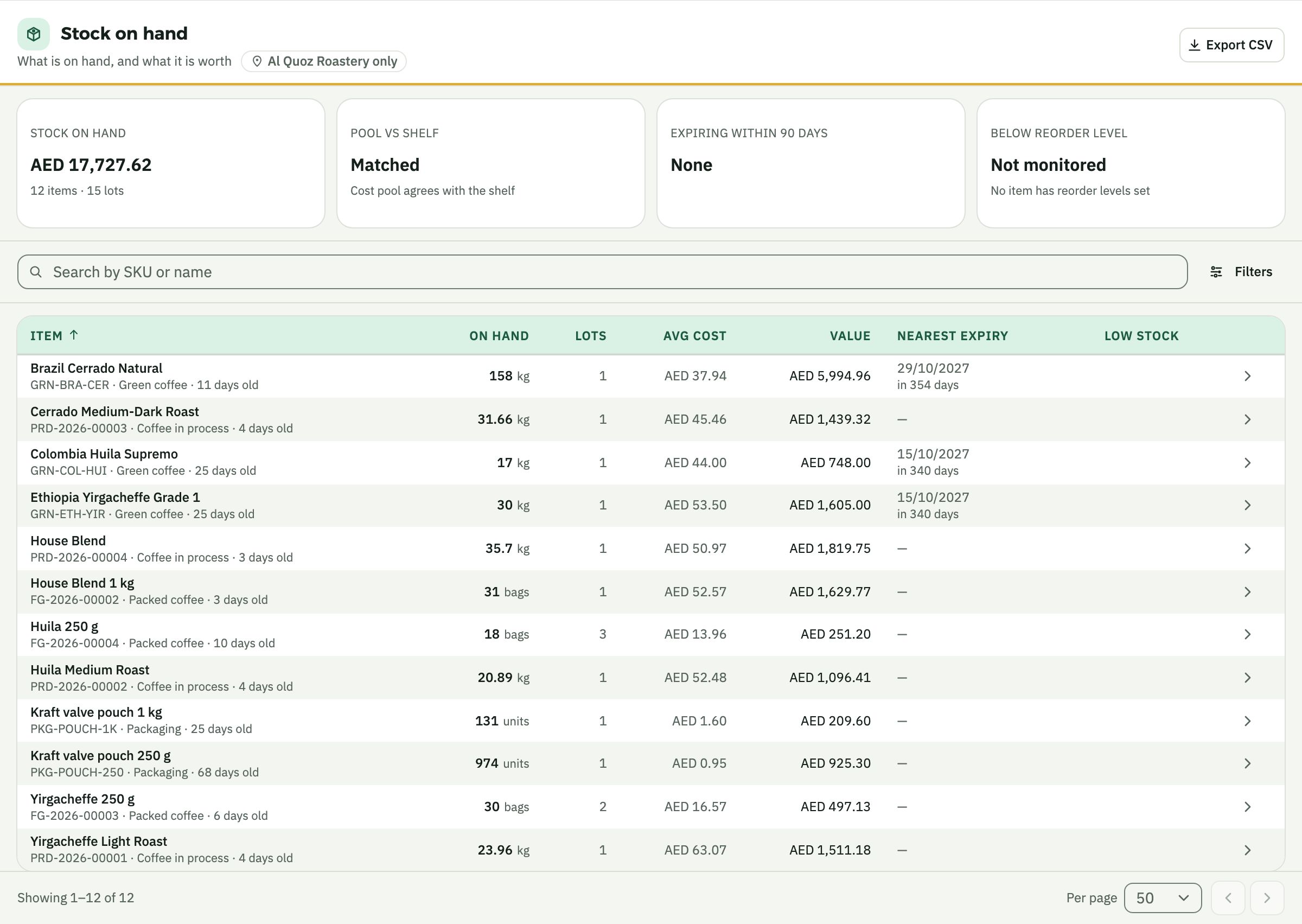
- Inventory valuation What your stock is worth today, at real cost.
- Revaluation Correct a cost properly, with a trail.
- Movement history Every move of one product, in order.
- Sell before it arrives A branch keeps selling, and stock catches up on delivery.
- Supplies and packaging Bags, labels and cups, tracked like everything else.
- Units of measure Buy by the sack, count by the kilo, sell by the bag.
- Barcode scanning Soon Receive, count and transfer with a scan.
- Counts on a phone Soon Walk the shelves and count from your pocket.
- Reorder suggestions Soon What to order, how much and by when, drafted for you.
- Shelf and bin locations Soon Know which shelf, not just which warehouse.
- Serial numbers Soon One machine, followed from import to customer.
- Demand forecasts Soon Next month, by branch and product, from your own sales.
Production and recipes
From raw material to finished goods, with the true cost at each step.
- Recipes and sub-recipes What goes into what, and in what amounts.
- Production orders Planned, in progress and done.
- Roast batches Weight in, weight out, and the roast loss inside the cost.
- Blends Before the roast or after it.
- Sorting Rejects weighed out, and the cost stays right.
- Packing and boxing From bulk to bags to boxes.
- Supplies used Bags, labels and lids taken off stock as you work.
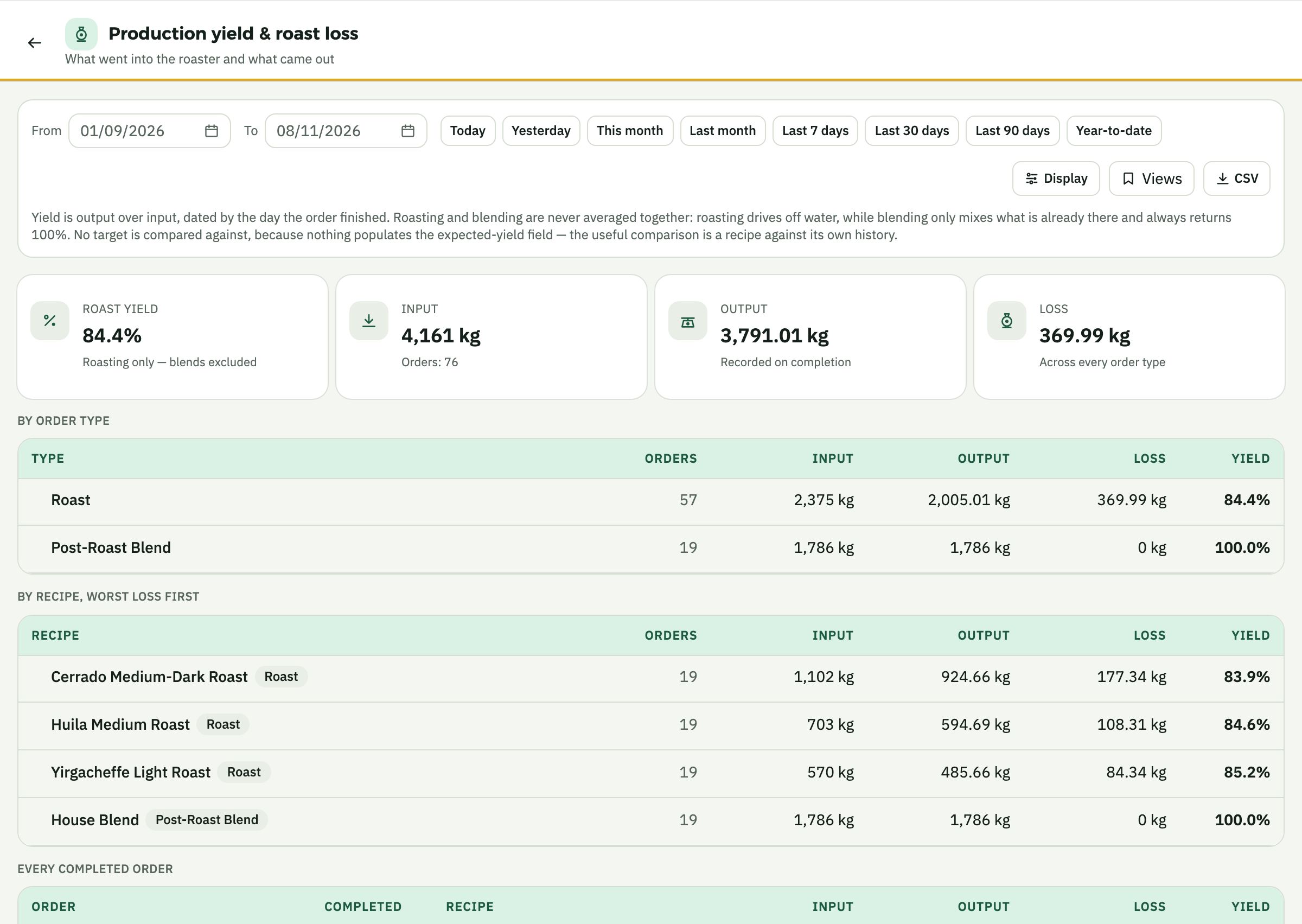
- Yield reports What came out against what went in.
- Production planning Soon What to make this week, from demand and stock.
- Roast profile import Soon Bring in your roaster logs, batch by batch.
- Quality and cupping Soon Scores and notes on each batch.
- Recall in one click Soon From a batch to every customer who has it.
- Roasting for others Soon Toll roasting, with their beans and your fee.
Purchasing and suppliers
From the first request to the paid bill, all tied together.
- Purchase requests Anyone can ask, and the buyer decides.
- Purchase orders Drafted, sent back, approved and printed.
- Approval limits A limit for each role. Above it, someone with a higher limit approves.
- Receiving and inspection Receive, inspect and close short.
- Supplier bills Order, delivery and bill, matched together.
- Bills read for you Drop in an invoice, and nothing posts until a person approves.
- Returns and credit notes Before the invoice or after it.
- Discounts received Inside the cost of what you bought.
- Landed costs Freight and duty inside the item cost.
- Price rise alerts Tells you when a supplier charges more than before.
- Supplier records Every supplier, with terms and history.
- Payment terms Due dates that work themselves out.
- Supplier spend Who you buy from, how much and at what price.
- Automatic reorders Soon Drafts the order when stock runs low.
- Compare supplier quotes Soon Side by side, per item.
- Supplier portal Soon Suppliers see their orders and send their own bills.
- Contracts and forward buying Soon Agreed prices, held to.
- Shipment tracking Soon What is on the water, and when it lands.
- Messages to suppliers Soon Drafted by the AI, sent by you.
Sales and tills
Every sale, with what it earned.
- Till sales, line by line In from your POS, on the day they really happened.
- Online store sales Web orders in the same books.
- Sales orders On account, for wholesale and hotels.
- Sales invoices With VAT, ready to send.
- Credit notes Crediting a sale puts everything back.
- Price master One price list, kept in one place.
- Discount tracking Who gave what, and what it cost you.
- Channel settlements What card and delivery channels owe against what they paid.
- Product margin What each product truly leaves you.
- Quotations From quote to order in one step.
- Customer ordering portal Soon Wholesale customers reorder by themselves.
- Delivery routes Soon Runs, drivers and proof of delivery.
- Subscriptions Soon Coffee every month, billed by itself.
- Offer planner Soon What an offer will earn, before you run it.
- Loyalty Soon Regulars rewarded, and counted in your margin.
- Mall sales reports Soon Monthly turnover files, ready for the landlord.
Customers
Who buys, who has gone quiet and who owes you.
- Customer page Orders, balance and conversations in one place.
- Pipeline From first contact to first order.
- Order rhythm Notices when a regular is late to reorder.
- WhatsApp follow-ups Stay in touch where they already are.
- Follow-up log Who said what, and what happens next.
- Merging duplicates One customer, one record.
- Customer sales What each customer buys and how often.
- Automatic reminders Soon Polite chasers for overdue invoices.
- Statements on WhatsApp Soon Their balance, on request.
- Credit limits Soon Warned before the order, not after the debt.
Accounting and finance
Entries made as you go, each tied to its cause.
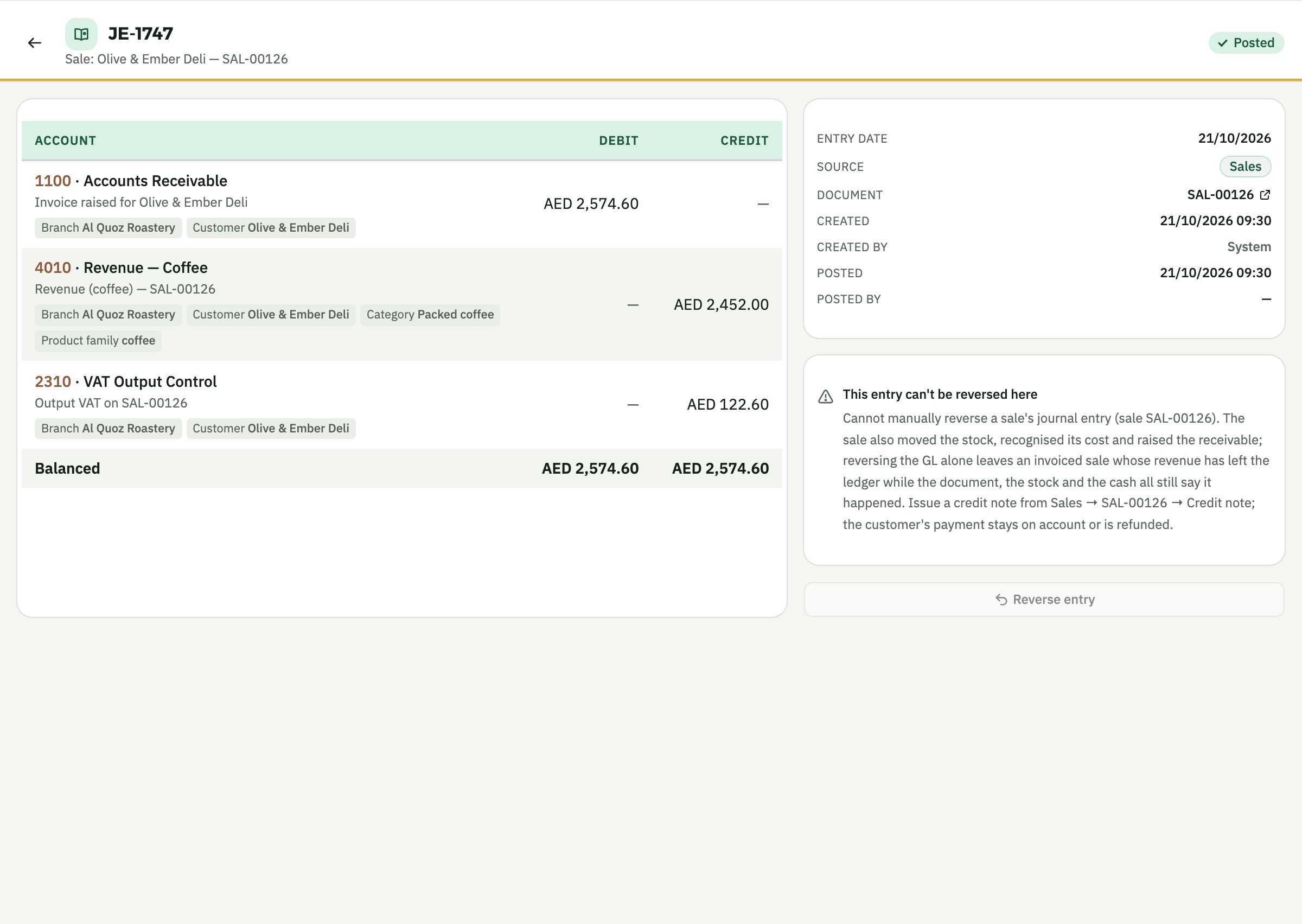
- Automatic journal entries Every entry links back to the document that caused it.
- Chart of accounts Ready for your trade, and yours to adjust.
- General ledger Every account, every line, back to the source.
- Profit and loss By branch and company, up to date the same day.
- Balance sheet and trial balance Ready whenever you ask.
- Cash flow statement Where the money went, and why.
- Bank payments and receipts Recorded once, in the right place.
- Bank reconciliation The bank against the books.
- Cheque register Issued, received, cleared or bounced.
- Receivables Who owes you, and which invoices a payment covers.
- Payables Who you owe, and when.
- Fixed assets Bought, depreciated on the 1st, sold or written off.
- Prepayments and leases Spread over the months they belong to.
- Branch accounts Every posting knows its company and place.
- Opening balances Start from your last trial balance.
- Period close A clean close that stays closed.
- Bank feeds Soon Transactions in by themselves.
- Budgets Soon Plan against actual, line by line.
- Cash forecast Soon What the bank will say in 90 days.
- Group accounts Soon All your companies consolidated, with inter-company removed.
- Many currencies Soon Buy in dollars, report in dirhams.
- Audit pack Soon Everything your auditor asks for, in one file.
VAT and tax
UAE tax, from the same records as everything else.
- UAE VAT returns Built from your own invoices and bills.
- VAT on every document Standard, zero-rated, exempt or reverse charge, with prices that include VAT or not.
- E-invoicing Soon Ready for the UAE's electronic invoicing rules.
- Corporate tax reports Soon Your 9% worked out from your books.
- Tax audit file Soon The file the FTA asks for, on demand.
Petty cash and expenses
A cash drawer per branch, with every receipt.
- Floats A drawer per person or place.
- Paying from a float Each purchase with its item, branch and VAT.
- Receipts by photo Attach the photo to the purchase.
- Reconciling a drawer What should be there, against what is.
- Replenishing Topped up with a trail.
- Small asset purchases Even a small asset goes on the register.
- Expense claims on a phone Soon Snap, submit and get approved.
HR and payroll
Your whole team, from first day to final settlement.
- Employee records Everyone in one place, with their contract and pay.
- Onboarding New joiners set up step by step.
- Departments Who sits where, and what it costs.
- Documents and renewals Visas, Emirates IDs and passports, with expiry alerts.
- Attendance A record for every day, from your time-clock file.
- Leave management Requests, approvals and balances, with UAE leave types.
- Leave balances and liability What each person has left, and what you owe for it.
- Public holidays On the calendar, and in the overtime.
- Overtime Calculated, not estimated.
- Payroll The monthly run, posted to the books by itself.
- Payslips Each person's slip, every month.
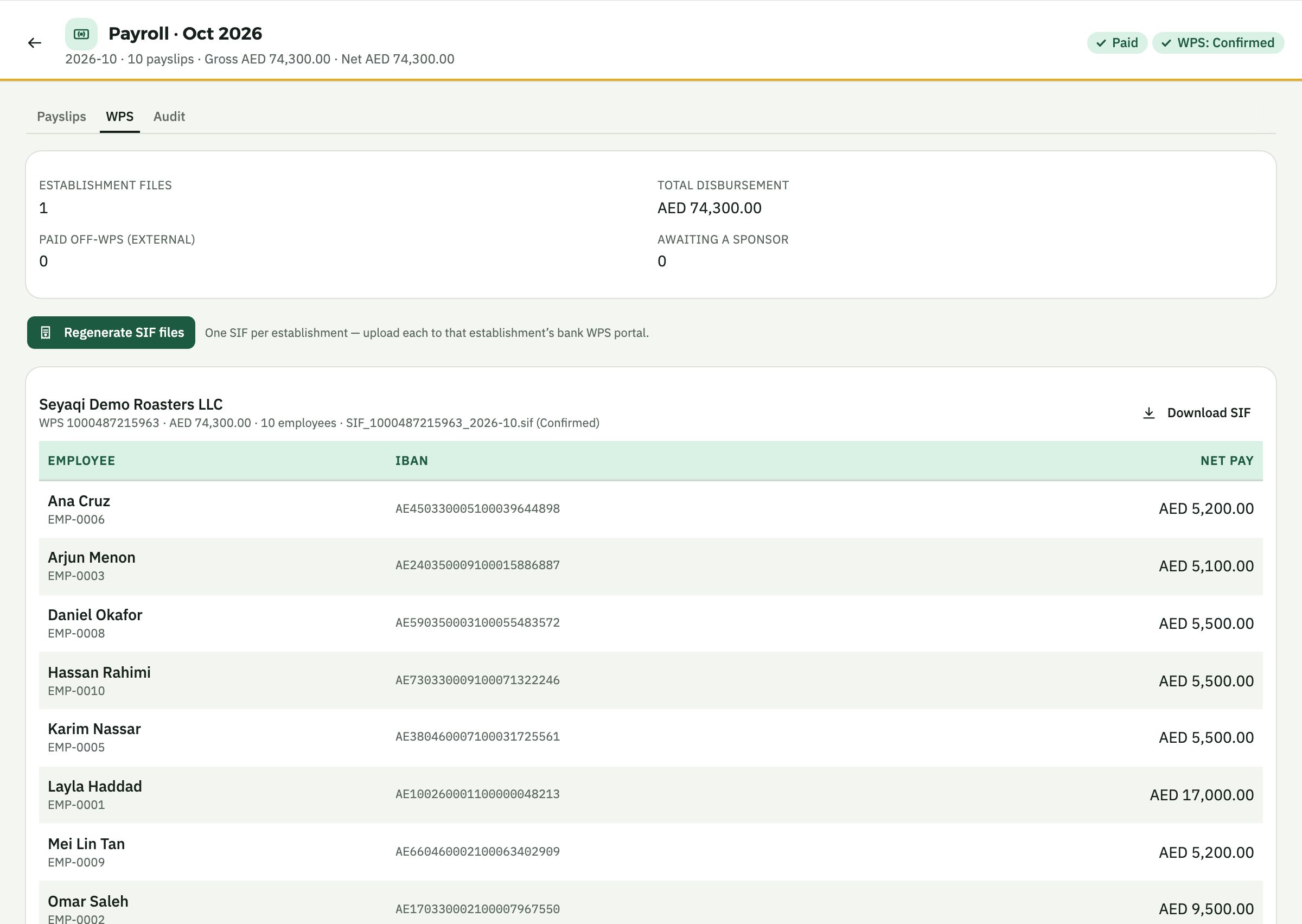
- WPS files The salary file, ready for your bank.
- Loans and advances Tracked until they are settled.
- Reimbursements Paid back through payroll, with a trail.
- End of service The gratuity you owe, month by month.
- Separations From notice to final settlement.
- Employee letters Salary certificates and the rest, in a click.
- Rosters and shifts Soon Who works when, per branch, against the sales forecast.
- Fingerprint and face attendance Soon Devices that feed attendance by themselves.
- Employee app Soon Payslips and leave requests on their own phone.
- Recruitment Soon From job post to first day.
- Health insurance Soon Policies, members and renewals.
- Tips and service charge Soon Shared out fairly, and on the payslip.
AI Advisor
Reads the whole business, and tells you what needs you.
- Reads everything nightly Stock, sales, purchases, what is owed, and the books.
- Insights with a next step What it found, what it's worth and what to do.
- Report summaries Profit and loss, cash flow and sales reports, explained in plain words.
- To do Tasks you can assign, answer or put aside.
- Figures from your records Every number is computed first. The AI only explains.
- Refund and charge watch A branch refunding or adding charges far more often than the others.
- Margin and price watch When a price rise reaches your products.
- Overdue watch Who is late, on either side.
- What sells together Baskets you could build on.
- What-if planner Soon New branch, new price, new hire: see the numbers first.
- Ramadan and season planning Soon Staff, stock and hours, from last year’s pattern.
- Morning brief on WhatsApp Soon What needs you, before you reach the shop.
- Voice notes Soon Ask by voice, in your own dialect.
- It acts, you approve Soon Drafts the order, the reminder or the message.
Reports and dashboards
The answers, without exporting anything.
- Today's page What needs you first, when you open the system.
- Owner's overview Each company at a glance.
- Group board Every company side by side.
- Branch comparison Sales, cost and margin, place by place.
- Sales reports By product, customer, channel and day.
- Payments report How you were paid, by method.
- Open items What is still waiting, across the business.
- Saved views Your filters, one click away.
- Scheduled reports Soon In your inbox, on the day you choose.
- Report builder Soon Build your own, without a consultant.
Equipment and service
For businesses that sell, install and look after machines.
- Customer equipment register Soon Every machine you sold, and where it is.
- Service jobs Soon From booking to invoice, with parts and hours.
- Maintenance schedules Soon Reminders before a machine needs you.
- Warranties Soon What is covered, and until when.
- Technician app Soon Jobs, parts and sign-off on a phone.
Connections and data
Starts from what you have, and works with what you run.
- POS systems Foodics, every hour, and Sapaad, from the day sheet you upload.
- Online stores Shopify, every hour.
- WhatsApp One-tap messages, written for you and logged.
- Start from your files Send what you have, with no templates to fill in.
- Delivery apps Soon Orders and commission in by themselves.
- Payment gateways Soon Card and link payments matched to invoices.
- Bills by WhatsApp Soon Forward a photo, and it becomes a bill.
- Open API Soon Connect anything else you run.
Security and control
Who can see what, who did what, and who signed it.
- Roles and permissions Tick by tick, for each company.
- Access by location Each team sees only its own places.
- Second-person approvals Write-offs, reversals, stock counts and revaluations.
- Activity log Who changed what, and when.
- Many companies, one owner Several licences and branches, side by side.
- Arabic and English Every screen, in both.
- Quick search Jump to any page, item or account from anywhere.
- Switch on what you need Every part is in your plan. Start with what you need, and turn the rest on when you are ready.
- Phone apps Soon For owners, managers and the warehouse floor.
Nothing under that word. Ask us directly
Real screens
What Seyaqi looks like inside.
Taken from the app itself, on a demo company. The names and figures are invented.
-
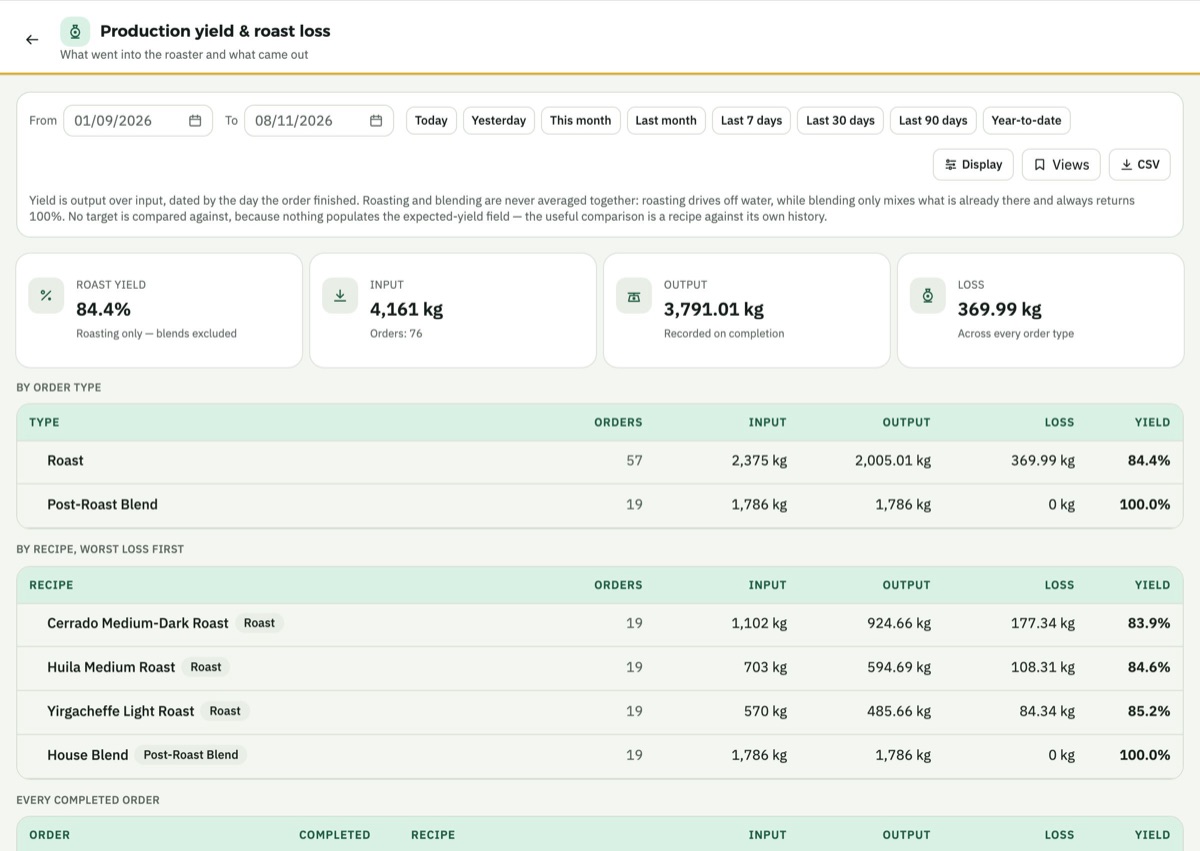
Roast loss, by recipe. What went into the roaster and what came out, worst loss first. -
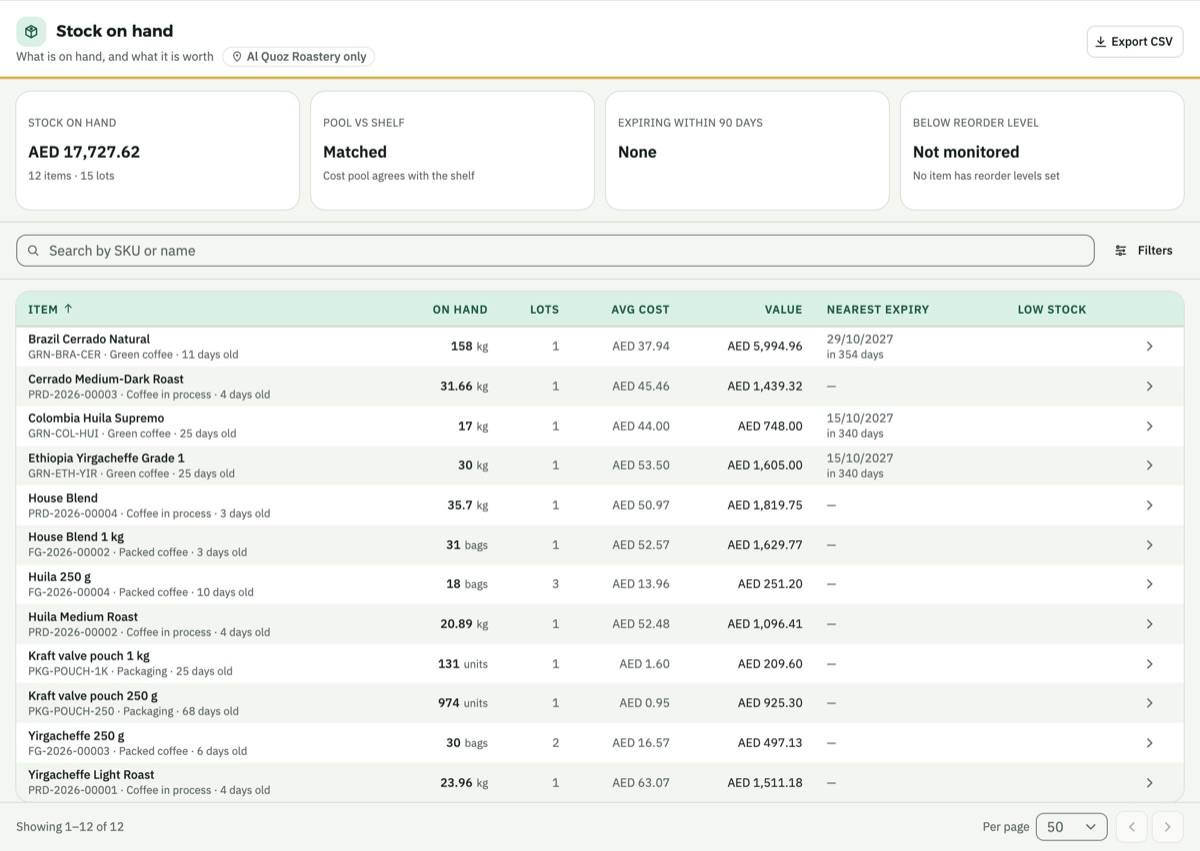
Stock at its real cost. Every lot with its date, average cost per kilo or bag, and value. -
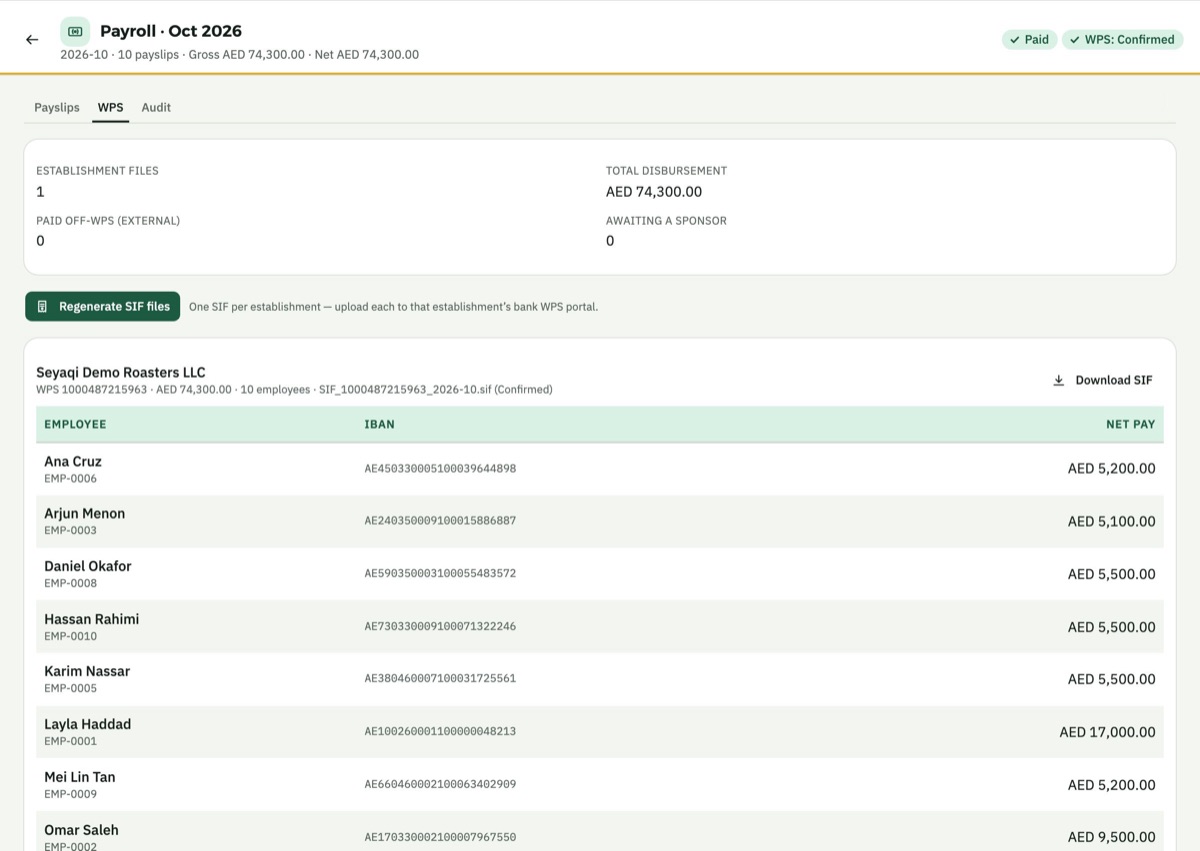
Payroll with its WPS file. The month's run, the salary file and every IBAN checked. -
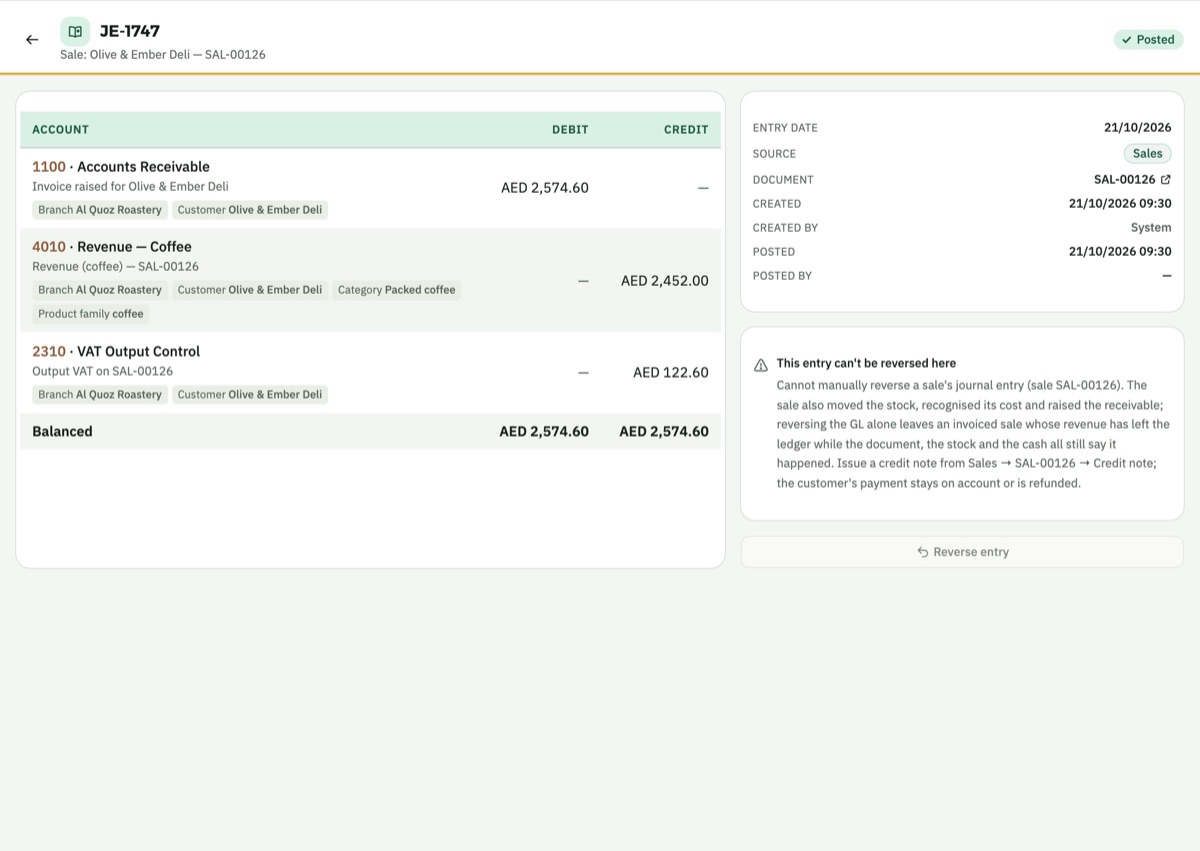
Every entry knows its cause. A journal entry with its branch, customer and the sale that made it.
Why Seyaqi
Generic ERPs record transactions. Seyaqi understands your business
Most businesses run on software made for every industry, then configured for their trade. Here is what changes when the system is built for your trade.
Industry editions
One AI core. Shaped for your industry
Each edition starts with the modules and chart of accounts its trade needs, on the same core. The Advisor knows which trade it is reading.
Proven in specialty coffee. One of the hardest trades to run: goods change weight, cost and form between buying and selling.
Roasteries
Green coffee to cup, with roast costing and branch tills.
LiveCafés
Recipes, tills and the true cost of every cup.
LiveWholesale
Price lists, standing orders and credit customers.
LiveEquipment trading
Machines and spare parts, imported at full landed cost and sold from stock.
LiveServices
Quotes, invoices and what customers owe, for the work you do.
LiveComing next Restaurants Manufacturing
Book a demo
See Seyaqi on a business like yours.
Tell us about your business. We'll show you Seyaqi set up for it.
- Answers on onboarding and the systems you use today
- In Arabic or English
Prefer email? info@seyaqi.com
We have your request.
We'll reach out on the email or phone you gave us to arrange the demo.